Ultimate Smart Home Devices Compatibility Guide
June 21, 2026 16 min read 3,115 words
Build a harmonious smart home effortlessly. Discover how devices connect and communicate for a truly integrated experience.
Start Your Smart Home Journey
Navigating the Smart Home Protocol Maze: Wi-Fi, Zigbee, Z-Wave, and Thread
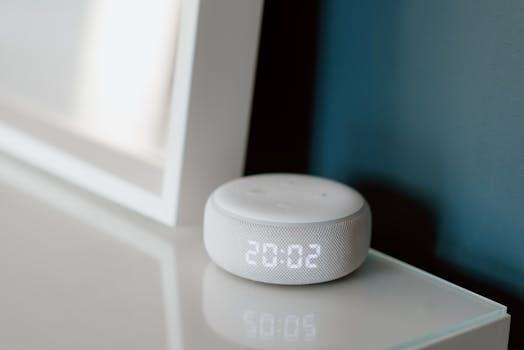 Photo: Anete Lusina / Pexels
The foundation of any functional smart home ecosystem lies in understanding how devices communicate with each other. This communication happens via various wireless protocols, each with its own strengths, weaknesses, and compatibility considerations. The most prevalent protocols you'll encounter are Wi-Fi, Zigbee, Z-Wave, and the emerging Thread standard. Grasping the nuances of these protocols is the first, crucial step in building a harmonized smart home that truly works for you.
**Wi-Fi** is perhaps the most familiar, as it's the same technology your smartphones, laptops, and smart TVs use to connect to the internet. Many smart home devices, particularly those requiring high bandwidth like security cameras or streaming devices, utilize Wi-Fi directly. Its primary advantage is ubiquity; you likely already have a Wi-Fi network. However, Wi-Fi devices tend to consume more power, which isn't ideal for battery-operated sensors, and each device connects directly to your router, potentially saturating your network if you have many smart gadgets. For instance, a Wi-Fi enabled smart plug is convenient, but a dozen such plugs might strain your home network's capacity.
**Zigbee** and **Z-Wave** are specifically designed for smart home applications. They operate on different radio frequencies than Wi-Fi (Zigbee often uses 2.4 GHz, similar to Wi-Fi, but with different channels; Z-Wave uses sub-1 GHz frequencies, like 868.42 MHz in Europe). Their key differentiator is their ability to create a 'mesh network'. In a mesh network, each powered device acts as a repeater, extending the network's range and improving reliability. This means if a device is out of direct range of your hub, it can still communicate by routing its signal through another nearby Zigbee or Z-Wave device. Both are low-power, making them excellent for battery-operated sensors, door locks, and light switches. Zigbee is known for its open standard and broader adoption by various manufacturers, while Z-Wave is a proprietary standard with strict certification requirements, often leading to more consistent performance and interoperability among Z-Wave devices. Devices like Philips Hue lights famously use Zigbee, requiring a Hue Bridge (a Zigbee hub) to connect to your Wi-Fi network and the internet.
**Thread** is a newer, IP-based mesh networking protocol built on open standards, aiming to provide a robust, secure, and low-power solution. It's gaining traction with major players like Google, Apple, and Amazon. Thread devices can communicate directly with each other and with the internet without a proprietary hub, as long as a 'Border Router' (often integrated into smart displays, Wi-Fi routers, or dedicated hubs) is present to bridge the Thread network to your Wi-Fi network. This makes Thread highly promising for future smart home interoperability, especially with the advent of Matter. Understanding these protocols is vital because a Zigbee device cannot directly talk to a Z-Wave device without a bridge or hub that supports both. Similarly, a Wi-Fi-only device won't join a Zigbee mesh. This is where a
smart home hub often comes into play, acting as a translator between different standards and unifying your diverse devices under one control system. Choosing devices that adhere to a common protocol, or investing in a versatile hub, will be paramount to avoiding compatibility headaches. Without this foundational knowledge, you risk purchasing devices that simply won't 'talk' to each other, leading to a fragmented and frustrating smart home experience.
The Role of Smart Home Hubs and Ecosystems in Unifying Your Devices
 Photo: Quang Nguyen Vinh / Pexels
Once you understand the various communication protocols, the next critical step in building a compatible smart home is selecting a central control point – often a smart home hub or a dominant ecosystem. These hubs and ecosystems are the conductors of your smart home orchestra, allowing devices that speak different 'languages' (protocols) to work together seamlessly. Without a unifying entity, your smart lights might not respond to your motion sensor, or your smart thermostat might operate in isolation from your window sensors.
**Dedicated Smart Home Hubs** like Samsung SmartThings, Homey, or Hubitat are designed to be protocol-agnostic to a significant degree. They often include radios for Zigbee, Z-Wave, and Wi-Fi, allowing them to communicate directly with a vast array of devices from different manufacturers. For example, a SmartThings hub can connect to Philips Hue lights (Zigbee), Aeotec Z-Wave sensors, and Wi-Fi enabled smart plugs, allowing you to create complex automations that involve all these devices. These hubs typically offer advanced customization options, local processing (meaning automations can run even without an internet connection), and robust privacy features. They are an excellent choice for users who want maximum flexibility and control, and who are comfortable with a slightly steeper learning curve. The benefit of a dedicated hub is its ability to centralize control, reducing the need for multiple apps and creating a truly integrated experience.
**Voice Assistant Ecosystems** such as Amazon Alexa, Google Assistant, and Apple HomeKit have emerged as powerful alternatives or complements to dedicated hubs. While they don't always have built-in Zigbee or Z-Wave radios (though some Alexa devices do, like the Echo 4th Gen), they excel at integrating with 'Works With' certified devices via Wi-Fi or through specific bridges. For instance, most smart devices today advertise compatibility with Alexa or Google Assistant. This means you can control them with voice commands, and often integrate them into routines within the respective assistant's app. Apple HomeKit offers a similar, highly secure ecosystem, often requiring devices to have specific HomeKit certification. The advantage here is simplicity and convenience; if your primary interaction is through voice commands or a single app, these ecosystems can be very effective. However, they rely heavily on cloud connectivity, and advanced cross-protocol automations might require additional setup or bridging devices.
Many users opt for a hybrid approach, using a dedicated hub for core automations and local control, while also integrating it with a voice assistant for convenient voice control. For example, you might use a SmartThings hub to manage your Zigbee and Z-Wave devices, then link your SmartThings account to Alexa or Google Assistant to control those devices with your voice. This layered approach offers the best of both worlds: robust local control and widespread voice accessibility. The key is to choose an ecosystem or hub that aligns with your technical comfort level and your desired level of control and device diversity. Researching which devices are certified to work with your chosen ecosystem will save you significant time and frustration in the long run.
Key Factors for Ensuring Device Interoperability and a Future-Proof Smart Home
Ensuring device interoperability is the cornerstone of a functional and frustration-free smart home. It's not just about getting devices to turn on and off; it's about enabling them to communicate intelligently, respond to complex automations, and evolve with your needs. Beyond understanding communication protocols and choosing a central hub, several other factors play a crucial role in achieving seamless integration and future-proofing your smart home. One of the most significant developments in this area is **Matter**, a new universal open-source connectivity standard championed by the Connectivity Standards Alliance (CSA), which includes tech giants like Apple, Google, Amazon, and Samsung. Matter aims to solve the compatibility puzzle by providing a unified language that devices across different ecosystems and protocols (like Wi-Fi, Thread, and Ethernet) can 'speak.' When you see a device with the Matter logo, it signifies that it should work reliably with any Matter-certified hub or controller, regardless of the brand. This represents a monumental step towards true plug-and-play smart home experiences, drastically simplifying the purchasing decision for consumers. While Matter is still rolling out, prioritizing Matter-compatible devices is a strong strategy for future-proofing.
Another vital factor is **manufacturer reputation and support**. While a device might claim compatibility, the quality of its integration can vary. Reputable brands often invest more in robust software, regular firmware updates, and comprehensive customer support, which are critical for long-term reliability. A device from a lesser-known brand might offer a lower price point but could lead to frustrating glitches, dropped connections, or lack of future updates, making it incompatible with new standards or security patches. Always check reviews and community forums for feedback on specific devices and their integration experiences with various ecosystems. Consider the availability of developer APIs (Application Programming Interfaces) as well. Devices or ecosystems that offer open APIs allow tech-savvy users or third-party developers to create custom integrations and automations, extending functionality beyond what the manufacturer initially provides. This open approach can significantly enhance the longevity and adaptability of your smart home setup.
Finally, **security and privacy considerations** are inextricably linked to compatibility and future-proofing. A device that integrates seamlessly but has poor security protocols is a significant liability. Ensure that devices support strong encryption, offer two-factor authentication, and receive regular security updates. Privacy policies are also crucial, especially for devices that collect personal data (e.g., cameras, voice assistants). Choose manufacturers and platforms that demonstrate a clear commitment to user privacy. As technology evolves, so do security threats. A future-proof smart home is one that can adapt to these changes through updates and robust design. For instance, opting for a
secure smart lock that integrates well with your overall system is far more important than just having any smart lock. By prioritizing Matter compatibility, reputable brands with strong support, and robust security/privacy features, you lay the groundwork for a smart home that is not only compatible today but also resilient and adaptable for years to come. This proactive approach minimizes headaches and maximizes the enjoyment and utility of your connected living space.
Common Compatibility Mistakes to Avoid and Expert Tips for a Seamless Setup
Building a smart home can be incredibly rewarding, but it’s also rife with potential pitfalls if compatibility isn't given due attention. Avoiding common mistakes can save you significant time, money, and frustration. Here are some of the most frequent compatibility blunders and expert tips to ensure a seamless setup.
**Common Compatibility Mistakes to Avoid:**
* **Assuming 'Smart' Means Compatible:** Just because a device is labeled 'smart' doesn't mean it will work with your existing setup. Many devices are designed for specific ecosystems (e.g., HomeKit-only) or rely on proprietary hubs that don't integrate with others. Always verify explicit compatibility statements.
* **Mixing Protocols Without a Bridge:** Trying to connect a Zigbee light bulb directly to a Z-Wave hub, or expecting a Wi-Fi device to participate in a Thread mesh without a border router, is a recipe for failure. Protocols need a translator (a hub) to communicate.
* **Overloading Your Wi-Fi Network:** Many Wi-Fi smart devices connect directly to your router. A large number of these can overwhelm your router's capacity, leading to slow performance, dropped connections, and overall network instability for all your devices, not just smart ones.
* **Ignoring Firmware Updates:** Outdated firmware can cause compatibility issues, security vulnerabilities, and performance problems. Neglecting updates can lead to devices failing to connect or integrate with new features.
* **Not Considering Geographic Regions:** Some smart home devices and protocols (like Z-Wave frequencies) are region-specific. A device purchased in the US might not work correctly or legally in Germany due to different radio frequencies or power regulations.
* **Buying Based Solely on Price:** While tempting, cheaper devices often skimp on critical features like robust integration, security, or long-term software support, leading to more headaches down the line.
**Expert Tips for a Seamless Smart Home Setup:**
* **Plan Your Ecosystem First:** Before buying any devices, decide on your primary smart home ecosystem (e.g., Google Home, Alexa, HomeKit, or a dedicated hub like SmartThings). This decision will guide all subsequent purchases.
* **Look for 'Works With' Badges:** Actively seek out devices that explicitly state 'Works with Alexa,' 'Works with Google Home,' 'HomeKit Compatible,' or 'Matter Certified.' These badges are your assurance of compatibility.
* **Read Reviews on Integration:** Don't just read reviews on a device's core function. Pay close attention to user experiences regarding integration with various hubs or voice assistants. Look for comments on ease of setup and long-term reliability.
* **Start Small and Expand:** Begin with a few core devices (e.g., smart lights and a smart speaker). Get them working perfectly together, then gradually add more devices. This allows you to troubleshoot issues incrementally.
* **Invest in a Capable Router:** If you plan on using many Wi-Fi smart devices, ensure your home router is modern, robust, and capable of handling numerous simultaneous connections. Consider a mesh Wi-Fi system for larger homes.
* **Utilize a Dedicated Hub for Mixed Protocols:** If you want the best of Zigbee, Z-Wave, and Wi-Fi, invest in a multi-protocol smart home hub. This centralizes control and simplifies cross-device automation.
* **Test Automations Thoroughly:** After setting up new devices or routines, test them multiple times under different conditions to ensure they trigger reliably and as expected.
* **Stay Informed:** The smart home landscape is constantly evolving. Keep an eye on industry news, especially regarding new standards like Matter, and firmware updates for your existing devices. This proactive approach ensures your smart home remains secure, functional, and compatible with future innovations.
